Monogram Preview Sheet Generator
Instantly preview your initials across 80+ monogram fonts. Create high-resolution proof sheets for your clients, or craft projects in seconds.
Loved by 74,973 creators
Join in seconds and download your Hi-Res monogram preview sheet - completely watermark-free.
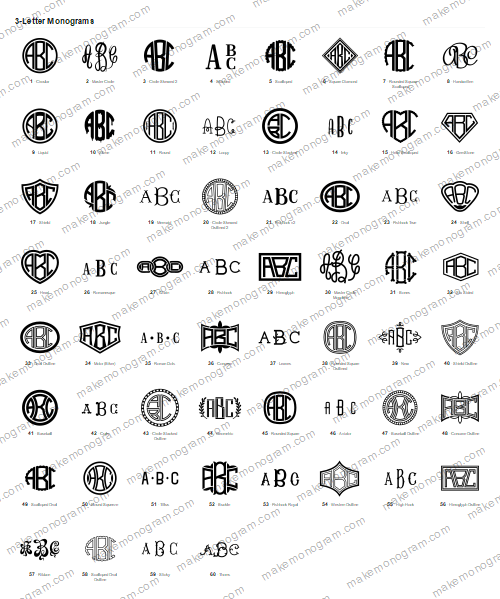
How the preview sheet works
- Type the initials. One, two or three letters. The sheet redraws as you type, there is no generate button to hunt for.
- Pick what goes on it. Drop the fonts you never use, and add a band of 2-letter or 1-letter monograms if you want them beside the 3-letter ones.
- Send it to your client. Download the sheet as a JPG, PNG or PDF. Every monogram on it is numbered, so the reply you get back is a number.
Who it is for
Anyone who has to get a font decision out of somebody else. Crafters cutting vinyl and HTV on a Cricut or Silhouette, embroiderers stitching towels and robes, and small shops taking custom orders all hit the same problem: describing a monogram font in words does not work, and sending screenshots one at a time is slow. A single numbered sheet turns a conversation into a choice.
Once the font is chosen, take that monogram over to the monogram maker and download it as a cut file (SVG, DXF, EPS or PDF) or as an embroidery file. Everything here is free for commercial use on the products you sell.
Questions
What is a monogram preview sheet?
It is one image showing the same initials drawn in every monogram font we have, each one numbered. Instead of describing fonts to a client, you send them the sheet, and they reply with a number.
Is the preview sheet generator free?
Previewing is free and unlimited - type your letters and the sheet redraws. Downloading the full-resolution sheet uses one of the free daily credits on your account, and one credit covers that sheet in every format you want.
Can I choose which fonts appear on the sheet?
Yes. Open “Choose fonts” and untick anything you do not use - script, block, circle and so on. If you are signed in the selection is remembered, so every sheet you make from then on is already your own font list.
Can I put 1-letter and 2-letter monograms on the same sheet?
Yes. Under “On the sheet” tick the styles you want and the sheet gets a band for each one. Every band has its own letters, so you can show ABC as a three-letter monogram and AB as a two-letter one on a single sheet.
What file formats can I download the sheet in?
JPG, PNG and PDF. PDF is the one to send a client who will print it; JPG is the smallest to send over a message.
Can I use the monograms commercially?
Yes. Once you download a monogram as a cut file or an embroidery file you can use it on products you sell. The preview sheet itself is a proofing tool - pick a font from it, then download that monogram from the monogram maker.